

Description
Download Wedding Video Maker of Photos with Song APK – Wedding, Birthday, Holiday Slideshow, Photo Video Editor, Android App
Overview
The Wedding Video Maker with Song is a free Android application developed by Zing Ping, designed to help users create personalized video slideshows using photos and music. The app serves as a straightforward tool for capturing and sharing special moments such as weddings, birthdays, holidays, and other emotional milestones. It enables users to compile personal images into engaging visual narratives enhanced with background music and creative effects. The target audience includes casual users, families, and individuals seeking an accessible way to preserve memories without requiring professional video editing skills. The application operates entirely on Android devices, supporting Android 5.0 and above, making it accessible to a broad user base. Real-world use cases include creating keepsake videos for family gatherings, romantic gestures, or social media content. The app's core purpose is to simplify the video creation process by integrating photo selection, music integration, theme customization, and preview functionality into a single intuitive interface. While the developer did not provide additional details about the app’s development background or team, its focus on ease of use and emotional storytelling is evident in its design and functionality.
Key Features & Capabilities
- Photo-to-Video Slideshow Creation – Users can select photos directly from their device’s storage and arrange them in a custom sequence using a drag-and-drop interface, enabling flexible control over the visual flow of the final video.
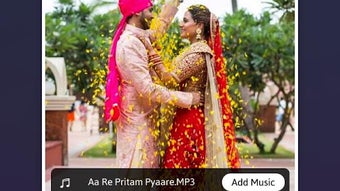
- Background Music Integration – The app offers a selection of built-in music tracks that can be applied to the slideshow, allowing users to match the mood of the video with appropriate audio.
- Video Themes – Multiple pre-designed themes are available, including wedding, birthday, holiday, love, and happy moments, each providing a unique visual style and transition effects tailored to specific occasions.
- Visual Effects – Users can apply various effects such as blur, color adjustments, and lighting enhancements to individual photos, adding depth and cinematic quality to the slideshow.
- Text and Title Customization – The app allows adding titles and subtitles with options to modify font style, size, and color, enabling users to include meaningful messages or event details.
- Real-Time Preview – Before finalizing the video, users can preview the entire slideshow to assess timing, transitions, music synchronization, and visual effects.
These features collectively support users in transforming static images into dynamic, emotionally resonant videos. For example, a user can create a wedding anniversary video by selecting wedding photos, applying a romantic theme, adding a heartfelt subtitle, and syncing it with a favorite love song. Similarly, a birthday tribute can be enhanced with festive transitions and celebratory music. The app’s workflow is optimized for simplicity, allowing even first-time users to produce polished results with minimal effort.
User Interface, Workflow & Performance
The application features a clean, minimalistic interface designed for ease of navigation. The main screen displays a timeline-style layout where users can drag and drop photos, adjust their order, and apply effects with intuitive touch gestures. Navigation is straightforward, with clearly labeled buttons for adding photos, selecting music, choosing themes, and previewing the output. The workflow follows a logical sequence: import photos → select theme → add music → apply effects → customize text → preview → export. This structure ensures a smooth user experience without overwhelming beginners. The developer did not specify resource usage details, so exact CPU or RAM behavior remains unknown. However, based on general software behavior patterns, the app is expected to operate efficiently on mid-range Android devices. Stability during video rendering and playback has not been publicly documented, but the app’s lightweight nature—28.4 MB in size—suggests low system strain. No reports of crashes or freezing were provided in the available information.
Compatibility & System Requirements
The app is compatible with Android 5.0 and above, ensuring accessibility across a wide range of devices. It is designed specifically for Android operating systems and is not available for iOS or desktop platforms. The installation size is 28.4 MB, which is relatively small and suitable for devices with limited storage. The developer did not provide additional system requirements, such as minimum RAM, processor speed, or GPU specifications. Exact performance details were not specified, and no information was given about hardware acceleration or video export resolution. Compatibility information was partially provided, with the operating system and version clearly stated, but other technical constraints remain undefined.
Pros and Cons
Pros
- Free to download and use with no in-app purchases mentioned
- Simple, intuitive interface ideal for non-technical users
- Supports a variety of video themes for different occasions
- Offers background music and visual effects for enhanced presentation
- Allows real-time preview before finalizing the video
- Small file size (28.4 MB) reduces storage impact
Cons
- Limited to Android platform; no support for Windows or Mac
- Exact export resolution and video format details not specified
- No information on cloud backup or file sharing integration
- Visual effects and theme options may be limited compared to professional tools
- Developer did not provide update frequency or future feature roadmap
FAQ Section
Is the Wedding Video Maker with Song available for iOS devices?
The app is currently available only for Android devices. There is no official version for iOS platforms.
Can I use my own music as background for the slideshow?
The app allows users to choose from built-in music tracks. Whether personal audio files can be used was not specified in the provided information.
Is the app safe to download and use?
The app is available on Google Play, which provides a vetted distribution channel. However, users should ensure they download from official sources to maintain security.
Does the app require an internet connection to function?
Based on the available details, the app appears to function offline. No mention was made of online services or cloud dependencies.
How often are updates released for the app?
The update frequency was not provided by the developer. Users should check Google Play for the latest version and release notes.
Final Thoughts + CTA
The Wedding Video Maker with Song APK delivers a focused, user-friendly experience for creating emotional video slideshows on Android. With its simple drag-and-drop interface, variety of themes, and built-in music options, it stands out as a practical tool for families and individuals who want to preserve special moments without technical complexity. While it lacks advanced editing features and cross-platform availability, its strengths lie in accessibility and ease of use. The app is particularly beneficial for users seeking a quick, free solution to create shareable videos for weddings, birthdays, and holidays. For those who value simplicity and emotional storytelling over professional-grade control, this tool offers a compelling option. Download Wedding Video Maker of Photos with Song APK now and turn your cherished memories into lasting visual stories.
Guides & Tutorials for Wedding Video Maker of Photos with Song APK
How to install Wedding Video Maker of Photos with Song APK
- Click the Preview / Download button above.
- Once redirected, accept the terms and click Install.
- Wait for the Wedding Video Maker of Photos with Song APK download to finish on your device.
How to use Wedding Video Maker of Photos with Song APK
This software is primarily used for its core features described above. Open the app after installation to explore its capabilities.
User Reviews for Wedding Video Maker of Photos with Song APK 0
No reviews found





